Articles in this section

How to See Why Inventory Moved in ShipHero

When operating a warehouse, you will likely end up moving around plenty of stock and inventory. While a good portion of this will be shipped and removed from the warehouse entirely, a good amount will also be moved around within the warehouse. The most common is from a receiving location to its final storage location. However, there are also a large number of minor inventory adjustments such as a broken storage location or consolidating inventory, as the picker has the option to identify the reason for the move on their device, which will then show in the inventory report:

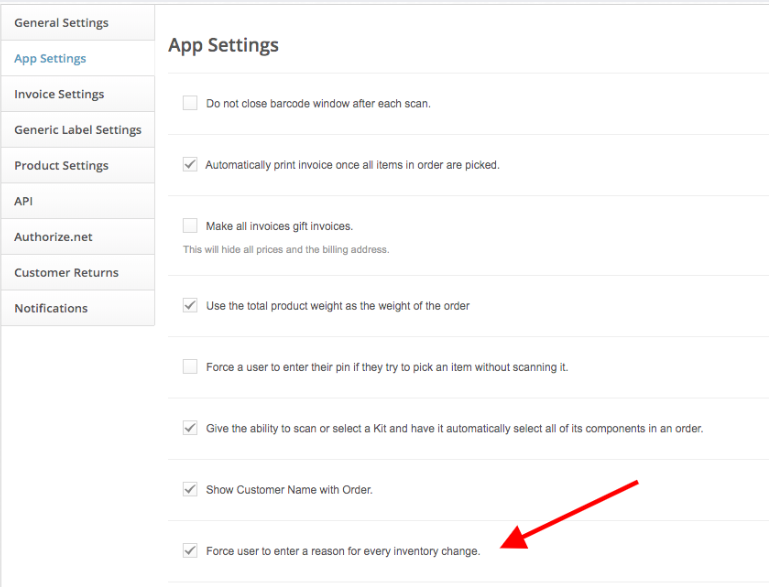
You can also force pickers to enter a reason when making an inventory adjustment with the following setting:
Was this article helpful?
3 out of 9 found this helpful

More Resources

  • ShipHero Public API

    Connect your tools and AI agents directly to ShipHero with the Public API. Build powerful integrations, automate workflows, and tap into real-time data using the AI tools you prefer, with the option for secure, read-only access for AI-driven insights without added risk.

  • ShipHero Academy

    Explore ShipHero Academy for certifications, deep-dive training, and expert-led courses on WMS and fulfillment. Build your expertise and help your team operate at a higher level.

  • Change Log

    Stay up to date with the latest improvements across ShipHero. The Change Log gives you a clear view of new features, enhancements, and fixes as they roll out—so you always know what’s new and what’s better.