You can view individual picker statistics using the Picker Report.
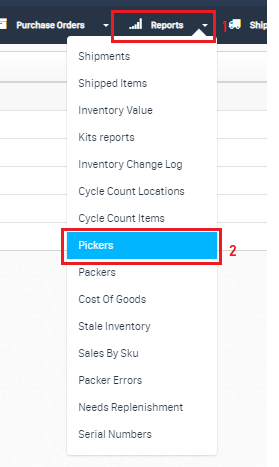
To find the report, go to https://app.shiphero.com/dashboard/pickers. If you are in the Dashboard, you can navigate to the Reports > Pickers option on the dropdown menu.
Once you are on the Picker Report page, you can check a picker's statistics using the View button under the Action column next to the Picker.
In the picker statistics information page, select the date for the information you want to view. This will show you the numbers of:
- Items picked: the total number of items picked.
- Orders picked: the total number of orders picked.
- Unique Items picked: the number of different SKUs picked.
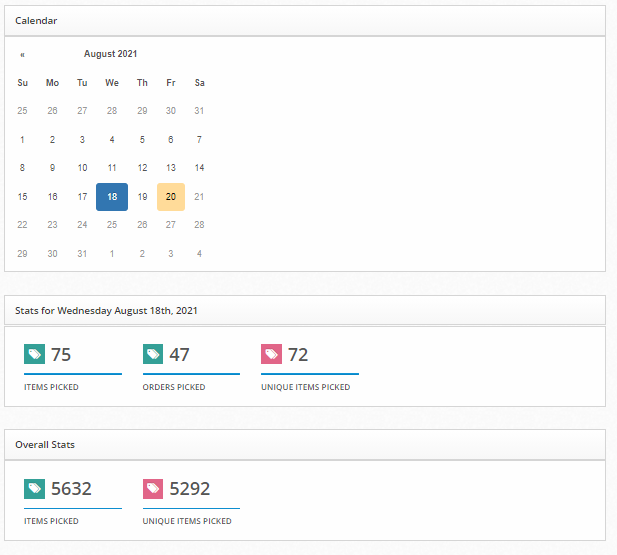 For example, if John picked a total of 270 items from 200 orders on Monday, and 11 of the items picked were the same SKU, his stats would appear as:
- 270 Items Picked
- 200 Orders Picked
- 258 Unique items picked
The Picker Report also calculates the overall statistics for the specific Picker. Under the Activity box, the report references the order number each item was picked for, the product that was picked, and which tote was used for the order.
How to Export Results
If you need the report results into a file, you have the option to export the data to CSV or PDF.
Export All Rows allows you to have all activity information, while the CSV or PDF option exports the results of the current view. In the illustration below, this is set to 25. The Column Visibility tab allows control over which fields you view on the page.
