Articles in this section

Understanding Internal Return Notes

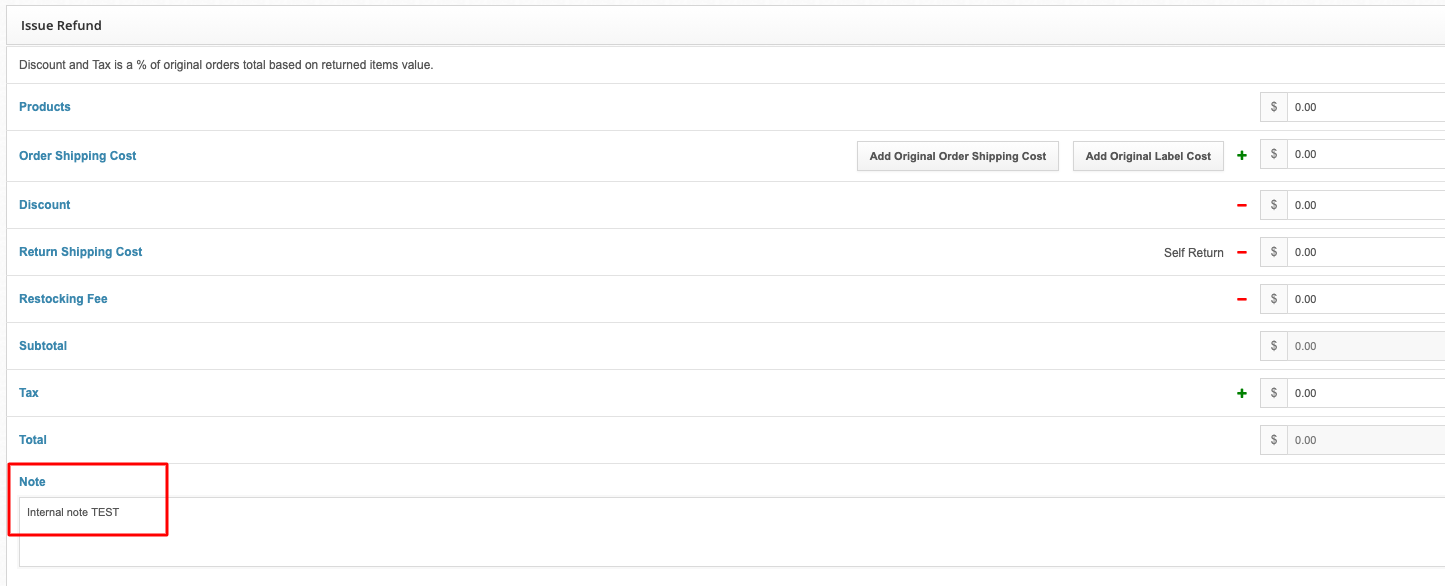
Internal return notes can be captured while processing returns under the Issue Refund section of the RMA. Common reasons for using this column would be to capture notes around why an item cannot be returned to inventory.
3_bce86233-d35e-46ee-966f-931aa341f80d.png

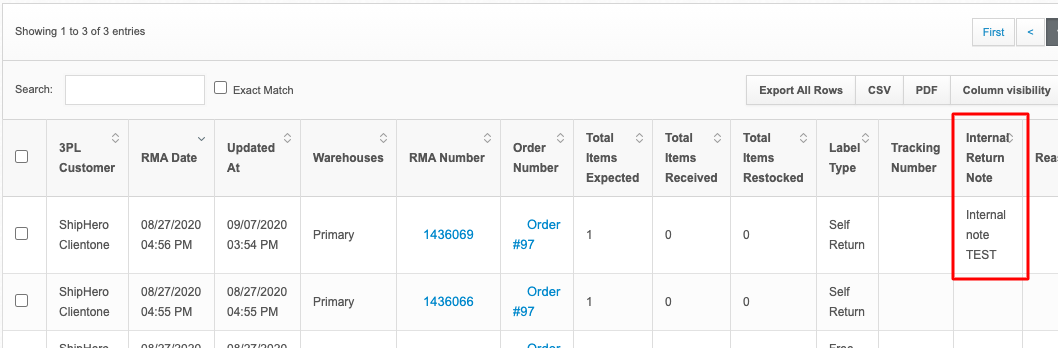
You can view these internal notes by going to app.shiphero.com > Returns > All Returns and reviewing the Internal Return Note column:
4_99fa9839-9d62-4096-8470-31eff615c94e.png

Was this article helpful?
1 out of 1 found this helpful

More Resources

  • ShipHero Public API

    Connect your tools and AI agents directly to ShipHero with the Public API. Build powerful integrations, automate workflows, and tap into real-time data using the AI tools you prefer, with the option for secure, read-only access for AI-driven insights without added risk.

  • ShipHero Academy

    Explore ShipHero Academy for certifications, deep-dive training, and expert-led courses on WMS and fulfillment. Build your expertise and help your team operate at a higher level.

  • Change Log

    Stay up to date with the latest improvements across ShipHero. The Change Log gives you a clear view of new features, enhancements, and fixes as they roll out—so you always know what’s new and what’s better.