Articles in this section

Troubleshooting: Customers Not Receiving Return Labels

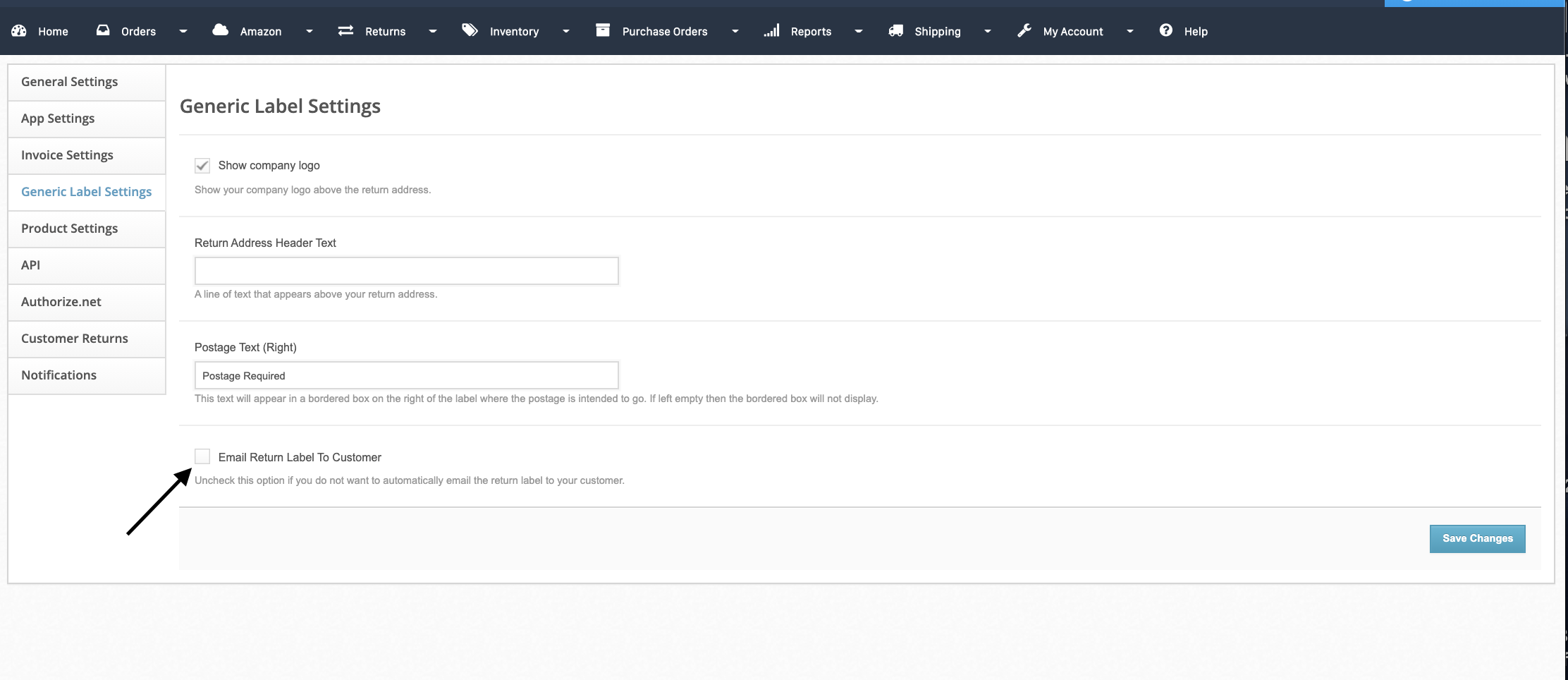
Verify that your account settings have the Email Return Label to Customer enabled. You can do this by following these steps:

  • Route to app.shiphero.com > My Account > Settings > Generic Label Settings
  • Check the box that says Email Return Label to Customer
    921d7f47-7df6-485d-954b-f10fb27a24d9.png
Was this article helpful?
0 out of 5 found this helpful

More Resources

  • ShipHero Public API

    Connect your tools and AI agents directly to ShipHero with the Public API. Build powerful integrations, automate workflows, and tap into real-time data using the AI tools you prefer, with the option for secure, read-only access for AI-driven insights without added risk.

  • ShipHero Academy

    Explore ShipHero Academy for certifications, deep-dive training, and expert-led courses on WMS and fulfillment. Build your expertise and help your team operate at a higher level.

  • Change Log

    Stay up to date with the latest improvements across ShipHero. The Change Log gives you a clear view of new features, enhancements, and fixes as they roll out—so you always know what’s new and what’s better.